Pro Tools
DarkStage follows Pro Tools' transport and timeline over HUI, with MIDI Time Code and MIDI Machine Control carrying timecode.
Before you begin: install and launch DarkStage, open DAW Sync, choose Pro Tools, confirm DAW Sync is running, and leave DarkStage open while you configure Pro Tools. See DAW Setup.
Pro Tools setup
1. Enable the DarkStage MIDI input
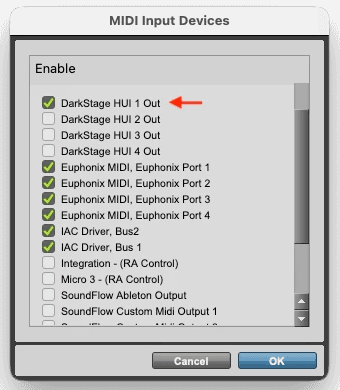
In Pro Tools, open Setup ▸ MIDI ▸ MIDI Input Devices and enable:
DarkStage HUI 1 In
2. Add the HUI controller
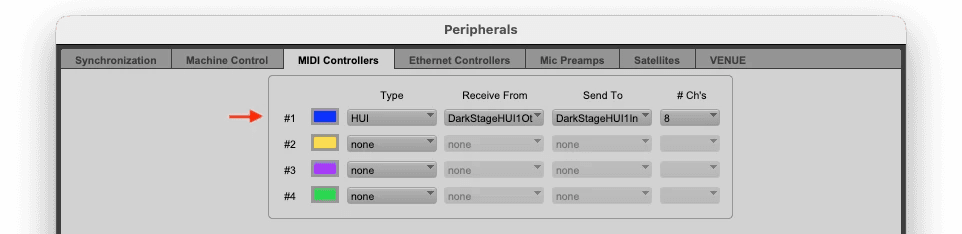
Open Setup ▸ Peripherals ▸ MIDI Controllers. In the next available slot, add a controller using:
- Type: HUI
- Receive From: DarkStage HUI 1 In
- Send To: the corresponding DarkStage HUI output
3. Set the MTC Generator Port
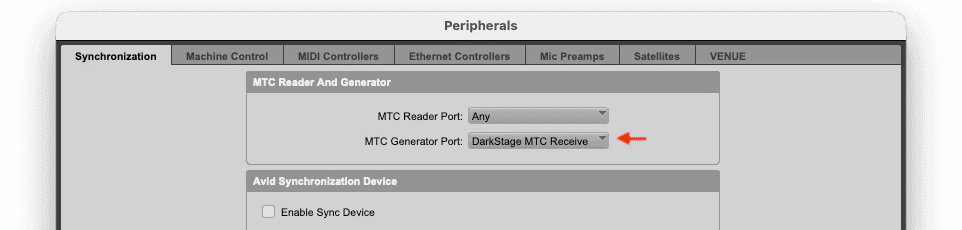
Still in Peripherals, open the Synchronization tab and set:
MTC Generator Port → DarkStage MTC Receive
4. Enable MIDI Machine Control
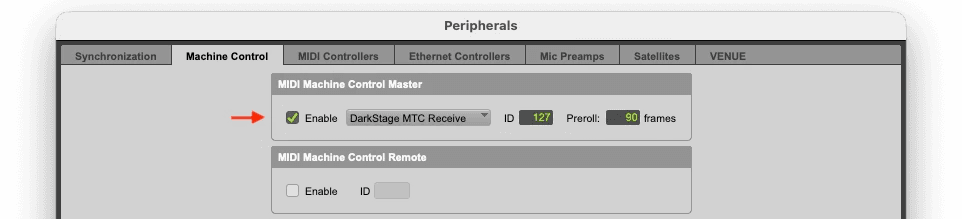
Open the Machine Control tab. Enable MIDI Machine Control and select DarkStage MTC Receive. Click OK to close the Peripherals window.
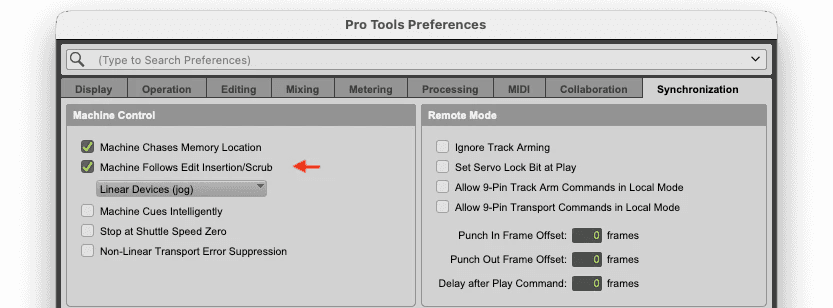
5. Enable Machine Follows Edit Insertion/Scrub
Open Pro Tools ▸ Preferences ▸ Synchronization. Under Machine Control, enable or select Machine Follows Edit Insertion/Scrub.
In testing, either related Machine Control dropdown selection worked. This lets DarkStage follow edit-location changes and timeline scrubbing as well as normal playback.
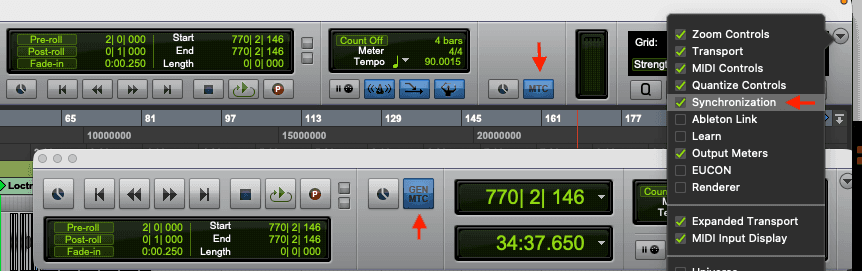
6. Enable GEN MTC
Click the GEN MTC button in the Transport window so that it is highlighted.
This step is essential. Pro Tools may send play, stop and locate commands without sending rolling MIDI Time Code when GEN MTC is off.
7. Press Play
Press Play in Pro Tools. DarkStage should now follow:
- Play and stop
- Timeline position
- SMPTE timecode
- Edit insertion and scrub locations
- Pro Tools transport status
Pro Tools troubleshooting
Transport works but SMPTE does not roll
Check that GEN MTC is highlighted in the Pro Tools Transport window.
DarkStage does not respond at all
Confirm:
- DarkStage DAW Sync is running.
- DarkStage HUI 1 In is enabled under MIDI Input Devices.
- The HUI controller is assigned correctly.
- MTC Generator Port is set to DarkStage MTC Receive.
- MIDI Machine Control is enabled.
- Machine Follows Edit Insertion/Scrub is enabled.
It worked, then stopped after relaunching DarkStage
In Pro Tools, open Setup ▸ Peripherals and click OK. That makes Pro Tools rescan its controllers and reconnect to the DarkStage ports.
Need more help?
Email support@mydarkstage.com and we'll help you get set up.